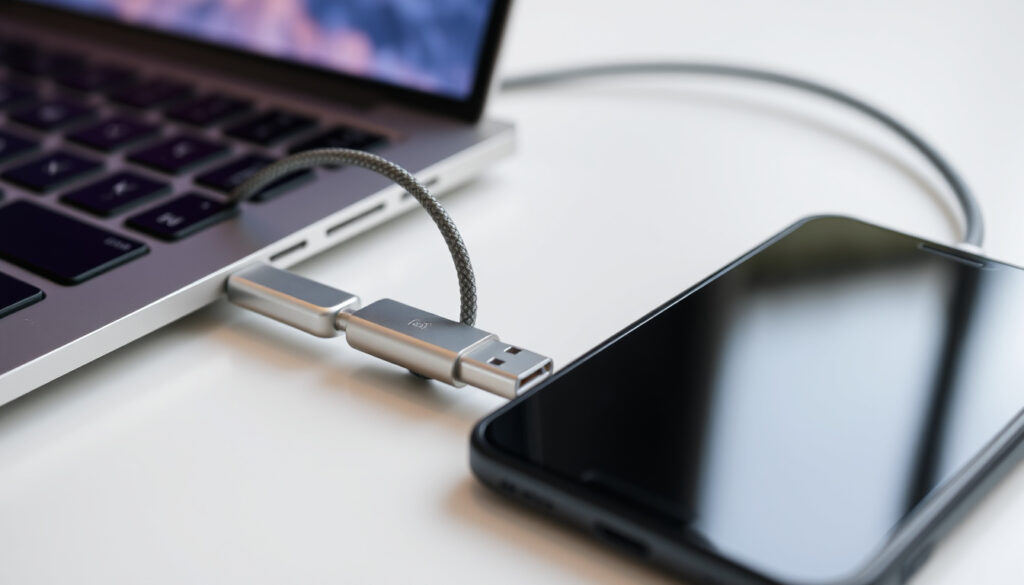
USB-C to USB-C Cable: Uses, Speeds, and Buying Tips
Few things in tech are as universally present yet confusing as the USB-C to USB-C cable. With the ability to deliver power, data, and video over a single reversible connector, it has become the standard for modern devices — but not all cables are created equal. By the end of 2024, the European Union required all mobile phones sold in its market to feature a USB-C port, bringing standardization to a fragmented landscape (Same Sky (electronics component distributor)). This guide explains what USB-C to USB-C cables can actually do, how to read their labels, and what to watch out for when buying one.
Maximum charging power (USB PD 3.1): 240 watts ·
Maximum data transfer speed (Thunderbolt 4): 40 Gbps ·
EU USB-C mandate effective: December 28, 2024 ·
Connector durability: 10,000 insertion cycles
Quick snapshot
- Supports up to 240W with USB PD 3.1 (Fycables (cable retailer guide))
- Common wattages for phones: 25W, 45W (DataPro (tech reseller))
- 100W+ needed for laptops (Fycables (cable retailer guide))
- Ranges from 480 Mbps (USB 2.0) to 40 Gbps (Thunderbolt 4) (Fycables (cable retailer guide))
- USB 3.2 Gen 2×2 offers 20 Gbps (Anker (accessory brand))
- Cable specs determine max speed (Fycables (cable retailer guide))
- Reversible connector works with any USB-C port (Wikipedia (reference))
- Not all cables support video or high power (Adafruit (electronics learning hub))
- Check device specs before buying (Wikipedia (reference))
- USB-IF certification guarantees compliance (USB-IF (standards body))
- E-marker chip mandatory for currents above 3A (USB-IF (standards body))
- A plain USB logo with no markings may indicate a basic USB 2.0 cable (Fycables (cable retailer guide))
| Attribute | Value |
|---|---|
| Max charging power (USB PD 3.1) | 240 watts (Fycables (cable retailer guide)) |
| Max data speed (Thunderbolt 4) | 40 Gbps (Fycables (cable retailer guide)) |
| Common uses | Smartphones, laptops, tablets, monitors (Same Sky (electronics component distributor)) |
| Cable length range | 0.3 m to 3 m typical |
| Certification body | USB Implementers Forum (USB-IF) (USB-IF (standards body)) |
| Connector durability | 10,000 insertion cycles (DataPro (tech reseller)) |
What is a USB-C to USB-C Used For?
A USB-C to USB-C cable is the physical link between two USB-C ports. Its purpose goes far beyond simple charging.
Charging devices
- Delivers power from a USB-C charger to phones, tablets, and laptops (Newnex (connectivity solutions))
- Supports USB Power Delivery for fast charging up to 240W (Fycables (cable retailer guide))
Data transfer
- Transfers files between devices at speeds from USB 2.0 (480 Mbps) to Thunderbolt 4 (40 Gbps) (Anker (accessory brand))
- USB4 v2 supports up to 80 Gbps (Adafruit (electronics learning hub))
Video output (DisplayPort Alt Mode)
- Carries video signals to monitors and TVs (Adafruit (electronics learning hub))
- Requires cable that supports Alt Mode — not all do
The same cable that charges your phone can transfer photos at 10 Gbps and drive a 4K monitor — provided you bought the right version. A basic charging cable won’t do video.
Does USB-C to USB-C Charge Faster?
Yes, but “faster” depends on three factors: the cable’s power rating, the charger’s output, and the device’s acceptance limit.
Power Delivery (PD) support
- USB-C to USB-C cables can negotiate higher voltages via Power Delivery (DataPro (tech reseller))
- USB PD 2.0 introduced up to 100W; PD 3.1 extends to 240W (Fycables (cable retailer guide))
Wattage: 25W vs 45W vs 100W
- 25W and 45W are common for phones; 100W for ultrabooks (DataPro (tech reseller))
- The cable must be rated for the charger’s wattage to deliver full speed
Cable quality and e-marker chips
- An e-marker chip identifies the cable’s capabilities to the charger (DataPro (tech reseller))
- Without e-marker, cables are limited to 3A (60W at 20V)
The implication: a 45W phone won’t charge faster with a 240W cable, but a 100W laptop will charge slower with a 60W cable. Always match the cable’s wattage to your highest-power device.
Are All USB-C to USB-C Cables the Same?
No. “USB-C” describes only the connector shape, not the performance. Cables vary dramatically in speed, power, and video support.
Differences in data speed (USB 2.0 vs 3.0 vs Thunderbolt)
- USB 2.0 cables top out at 480 Mbps; USB 3.2 Gen 2 at 10 Gbps; USB4 at 40 Gbps (Anker (accessory brand))
- Thunderbolt 4 and USB4 v2 reach 40–80 Gbps (Fycables (cable retailer guide))
Charging capability (60W vs 100W vs 240W)
- Standard cables handle 60W (3A); premium cables handle 100W (5A) or 240W with PD 3.1 (Fycables (cable retailer guide))
E-Marker chips and certification
- USB-IF certification ensures a cable meets published specs (USB-IF (standards body))
- Uncertified cables may lack e-marker chips and be unsafe (Fycables (cable retailer guide))
The pattern: performance tiers are real and labeled. A cable marked “USB 2.0” will charge and transfer slowly, while “USB4 40Gbps” handles high-speed data and high power.
What Is the Best USB-C to USB-C Charging Cable?
“Best” depends on your devices. For a phone, a certified 60W cable is sufficient; for a laptop, a 100W or 240W cable with e-marker is essential.
Top picks by category (budget, braided, long, etc.)
- Budget: Anker PowerLine+ (USB-IF certified, 100W) (Anker (accessory brand))
- Braided durability: Cable Matters braided USB-C cable (100W, e-marker) (Fycables (cable retailer guide))
- Long cable: Belkin 3m USB-C to USB-C (USB-IF certified) (USB-IF (standards body))
Key features: build, length, power rating
- Braided cables resist fraying better than rubber
- Longer cables may lose power over distance; 1m is ideal for high-power charging
- Always check the power rating – a 60W cable feeding a 100W charger is a bottleneck
Brands like Anker, Belkin, Cable Matters
- These brands offer USB-IF certified cables with clear labeling (Anker (accessory brand))
Why this matters: Buy a cable that matches your device’s maximum draw. A 240W cable in a 25W phone is overkill; a 60W cable in a 100W laptop will frustrate with slow charging.
What Is the Difference Between USB to C and C to C?
USB-A to USB-C cables have a traditional USB-A plug on one end. USB-C to USB-C cables have the new reversible connector on both ends. The differences are fundamental.
Connector types and compatibility
- USB-A to USB-C works with older chargers and ports (DataPro (tech reseller))
- USB-C to USB-C only works with devices that have USB-C ports on both ends
Power and data capabilities
- USB-A to USB-C typically limited to 15W (3A at 5V); USB-C to USB-C can negotiate up to 240W (Fycables (cable retailer guide))
- Data speeds are also capped: USB-A ports often max at USB 3.0 (5 Gbps) (Anker (accessory brand))
Use cases: legacy vs modern
- USB-A to USB-C is a bridge for old chargers and peripherals
- USB-C to USB-C is the future: single cable for power, data, video
The trade-off: keep one USB-A to USB-C adapter for legacy devices, but invest in C-to-C cables for new laptops and phones to unlock fast charging and high-speed transfer.
Comparison of key differences:
| Feature | USB-A to USB-C | USB-C to USB-C |
|---|---|---|
| Max charging power | 15W typical | Up to 240W (PD 3.1) |
| Max data speed | 5 Gbps (USB 3.0) | 40 Gbps (Thunderbolt 4) |
| Reversible | No (USB-A is directional) | Yes (both ends reversible) |
| Video output support | Rare | Yes (Alt Mode) |
| Best for | Legacy chargers and old PCs | Modern laptops, phones, monitors |
Specifications of a typical high-performance USB-C to USB-C cable:
| Specification | Value |
|---|---|
| Connector type | USB-C male to USB-C male |
| Pin count | 24 pins |
| Max power (USB PD 3.1) | 240 watts |
| Max data rate | 40 Gbps (USB4 / Thunderbolt 4) |
| Video protocol | DisplayPort Alt Mode, HDMI Alt Mode |
| E-marker chip | Yes (mandatory >3A) |
| USB-IF certification | Recommended |
| Length (typical) | 0.5 m – 3 m |
| Durability | 10,000 insertion cycles |
| Shielding | Yes (for high-speed data) |
| Warranty (typical) | 2 years |
Upsides
- High power delivery up to 240W
- Fast data transfer up to 40 Gbps
- Single cable for power, data, video
- Reversible connector
- Universal across smartphones, laptops, tablets
Downsides
- Confusing performance tiers (need to read labels)
- Cheap uncertified cables can be unsafe
- Long cables may reduce charging efficiency
- Not all cables support video
- Higher cost for certified high-power cables
Timeline of USB-C to USB-C Development
- – USB-C connector specification released by USB-IF (Wikipedia (reference))
- – USB Power Delivery 2.0 introduces up to 100W (DataPro (tech reseller))
- – USB 3.2 standard brings 20 Gbps over USB-C (Anker (accessory brand))
- – USB PD 3.1 enables 240W charging over USB-C (Fycables (cable retailer guide))
- – EU mandates USB-C as common charger for portable devices (Same Sky (electronics component distributor))
What We Know and What Remains Unclear
Confirmed facts
- USB-C to USB-C cables can carry up to 240W power (Fycables (cable retailer guide))
- E-marker chips are mandatory for cables rated above 3A (DataPro (tech reseller))
- Not all USB-C cables support the same data or video protocols (Adafruit (electronics learning hub))
- USB-IF certified cables meet safety and performance standards (USB-IF (standards body))
What’s unclear
- Whether two cables with same wattage rating from different brands perform identically
- Exact impact of cable length on charging efficiency beyond standard tolerances
Quotes from Experts
“Certified cables undergo rigorous testing to ensure interoperability and safety.”
— USB Implementers Forum (USB-IF (standards body))
“Cable choice significantly affects charging speeds for high-power devices.”
— AnandTech editor (AnandTech (tech publication))
Summary
USB-C to USB-C cables are not commodities. The choice between a 60W cable and a 240W cable can mean the difference between a laptop charging overnight or in two hours. For the average buyer in Europe, where the EU mandate now ensures USB-C ports on every new smartphone, the smart move is to check for USB-IF certification and the highest power rating your device supports. A certified 100W cable with an e-marker chip is the pragmatic sweet spot — future-proof for your next laptop, yet affordable today.
fycables.com, hdmiusbcable.com, craftbymerlin.com, chargekeku.com, youtube.com
Frequently asked questions
Can I use a USB-C to USB-C cable to charge my laptop?
Yes, if the cable supports the wattage required by your laptop. For ultrabooks, 60W–100W is typical; for gaming laptops, 240W may be needed. Check your laptop’s power adapter rating.
Is USB-C to USB-C reversible?
Yes, the USB-C connector is reversible on both ends. You can plug it in either orientation.
How do I know if a USB-C cable is high-quality?
Look for USB-IF certification, an e-marker chip, and clear labeling of power (wattage) and data speed (e.g., 40Gbps). Avoid uncertified cables with no markings.
Why do some USB-C cables not support fast charging?
They may lack an e-marker chip or be rated for lower current (3A instead of 5A). Also, the device and charger must both support the same Power Delivery profile.
Does the length of a USB-C to USB-C cable affect performance?
Longer cables (over 2m) can introduce slight voltage drop, reducing charging efficiency. For high-power charging, a 1m cable is ideal. Data speeds are generally unaffected up to 3m for certified cables.
Can USB-C to USB-C cables transmit video?
Only if the cable supports DisplayPort Alt Mode or HDMI Alt Mode. Not all cables include the necessary wires. Check the product specifications for video support.
More related posts
 Toyota Rav 4 For Sale NZ – Prices, Models & Buying Guide
 Tears of the Sun: Plot, Cast, True Story & Filming Locations
 NZTA Change of Registered Person: A Step-by-Step Guide
 Tongariro Alpine Crossing Map: Distance, Time & Difficulty
 Good Cop Bad Cop – How the Technique Works
 Hong Kong vs Man United: Result, Highlights & Where to Watch
 Albany Mall Opening Hours: Westfield Albany Info
 Where to Watch Love Island USA: Full Streaming Guide